更新內容

更新日誌

追蹤 Snapzy 的每一次更新、修復與改進。

v2.1NewOctober 25, 2026

Pick Color Loupe, Cut Out Tool, Smarter Scrolling Capture & Snapzy in Your Recordings

Pick any pixel with a live, pixel-exact loupe, cut a strip out of the middle of an image, and capture long real-world pages with window chrome and faded margins handled. Snapzy's own capture UI now shows up in screen recordings, so you can finally record tutorials of Snapzy itself.
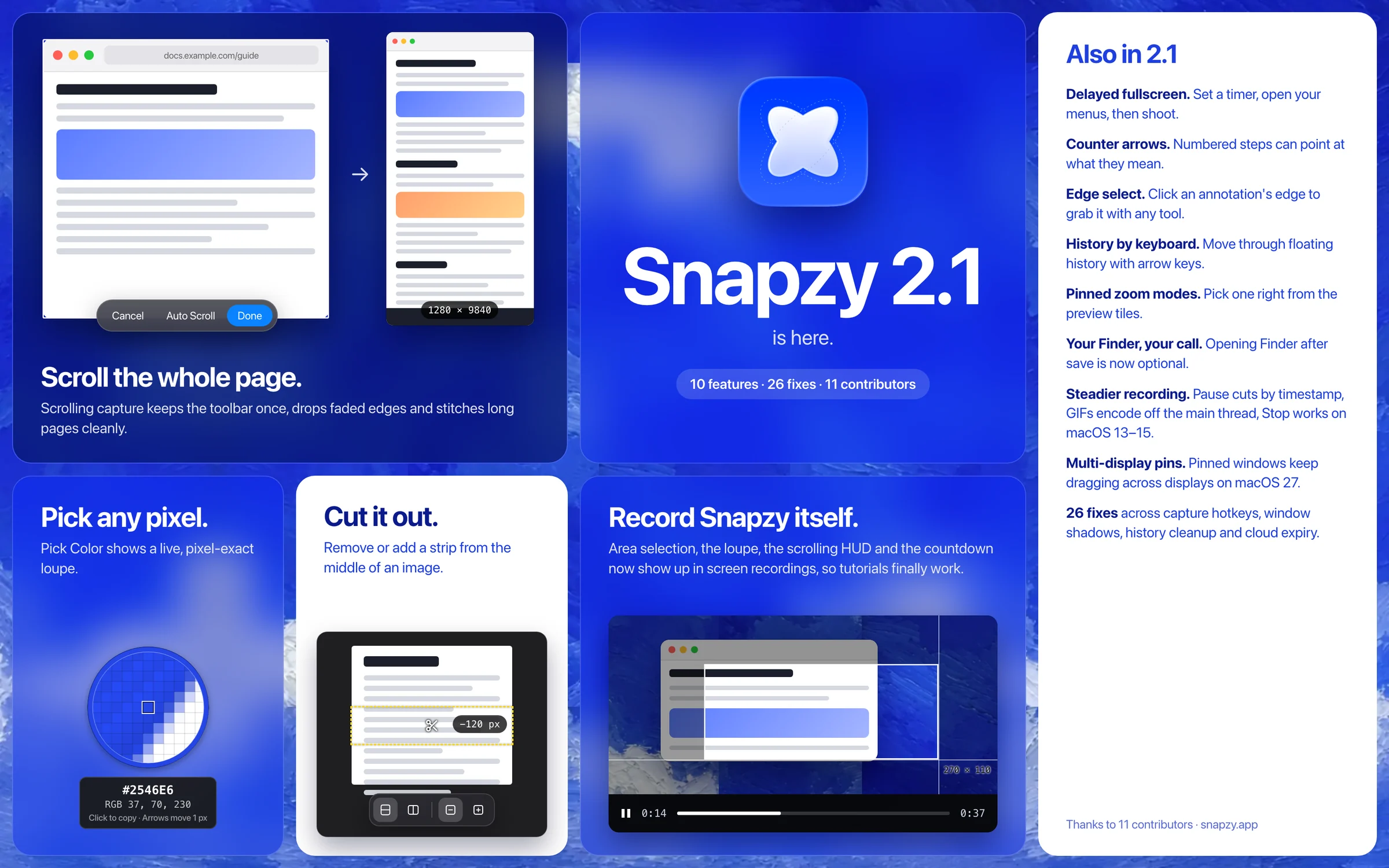
Pick Color Loupe, Cut Out Tool, Smarter Scrolling Capture & Snapzy in Your Recordings illustration
新增
  • Show Snapzy's capture chrome (area selection, loupe, scrolling HUD, countdown) in screen recordings (#682)
  • Pick Color with a live, pixel-exact loupe (#668)
  • Cut Out tool to remove or add a strip from the middle of an image (#654)
  • Delayed fullscreen screenshot (#638)
  • Attached arrows for counter annotations (#626)
  • Click an annotation's edge to select it with any tool (#629)
  • Select pinned image zoom mode directly from preview tiles (8e9b9923)
  • Keyboard navigation in floating history (#616)
  • Option to skip opening Finder after saving (#631)
改進
  • Scrolling capture handles real pages: window chrome, faded margins and long scrolls (#609)
  • Magnifier color panel unlocked, with a new magnifier size setting (#665)
  • GIFs resize off the main actor and stream frames to the encoder
修復
  • Recording stop button not responding on macOS 13–15 (#655)
  • Pinned window drags across displays on macOS 27 (#677)
  • Live capture no longer swallows the capture hotkey's keyUp (#679)
  • Paused recording spans are cut by sample timestamps
  • Retention sweep no longer deletes every history thumbnail
  • Annotations stay in place after Cut Out and inline selection resize
  • Shadowed window captures keep native resolution (#657)
  • Quick Access panel stays out of screenshots when Snapzy is excluded (#660)
  • Menu bar icon hidden by the notch is detected and Settings opens on reopen (#674)
  • Remapped and consumed keystrokes captured correctly (#539)
  • include_window_shadow synced with config.toml (#630)
  • Restored screen crop placement corrected in screenshots (#642)
v2.0September 28, 2026

Liquid Glass Design System, Full Display Recording, Delayed Capture & Crop Dragging

A major release introducing the macOS Liquid Glass design language across capture overlays, annotations, preferences, and the video editor. Features single-click or Enter full display recording, a configurable delayed capture countdown, drag-to-draw crop boundaries in the annotate editor, and a maximum recording resolution cap for broad H.264 browser compatibility.

新增
  • Redesigned capture HUD, annotator, video editor, and preferences with macOS Liquid Glass design language (#574)
  • Click any display or press Enter to record the full screen (#611)
  • Delayed capture mode with configurable countdown timer for scheduled screenshots (b7110d10)
  • Drag-to-draw support for creating custom crop boundaries in annotate editor (#605)
  • Added maximum recording resolution cap to improve H.264 video playback compatibility in browsers (#601)
  • Automated breaking change detection in release changelog generation (c064f987)
改進
  • Modernized video editor timeline with refined zoom/speed controls, non-destructive session persistence, and streamlined export drawer (#574)
  • Explicit Swift concurrency actor boundaries and modern AppKit integrations (#574)
修復
  • Reset delayed capture countdown when using Restore Defaults (#613)
  • Fixed text annotation background color by promoting plain text to label (#594)
v1.32+3 patchesSeptember 16, 2026 – September 20, 2026

Curved Arrow Handles, Camera Overlay, Modern Preferences & Smart Element Detection

Introduces interactive control handles for curved arrows, webcam picture-in-picture overlay for screen recordings, a modernized preferences interface with interactive onboarding, drag-to-app from History cards, floating history panel pinning, and instant smart element detection under the cursor.

新增
  • Interactive control handles for curved arrows to adjust bend arc after drawing (#567)
  • Picture-in-picture camera overlay for screen recordings with built-in and external webcam support (#560)
  • Modernized preferences window, sidebar navigation, and interactive onboarding flow (#557)
  • Pin action and keyboard shortcut for the History floating panel (#552)
  • Drag-to-app gesture support from History cards with scroll-safe gesture arbitration (a8d633a8)
  • Layered smart element and window auto-detection under cursor to reduce capture friction (#472)
  • Visual progress indicator and outcome notifications for OCR captures (#505)
  • Added collapsible contributors section in About preferences (8e75afb2)
改進
  • Enhanced spacebar pan gesture to keep selection locked firmly to pointer during area capture (#504)
  • Surfaced hours in capture and recording duration labels (#490)
  • Improved Japanese localization wording across preferences and tooltips (#513)
修復
  • Prevented corrupted or duplicate seams during scrolling auto-scroll (#538)
  • Added AnnotateWindowEventRouter to isolate annotation viewports across multiple windows (#553)
  • Fixed canvas hit testing under SwiftUI zoom and pan transforms (348bd768)
  • Fixed selection chrome sizing and handles rendering during zoom (2dc8e9e5)
  • Fixed drawing over existing annotations without unwanted selection trigger (#546)
  • Ensured canvas drop shadows render accurately in exported screenshots (#510)
  • Fixed Carbon global hotkey matching using CGEventTap (f591f320)
  • Resolved recording session shortcut gating timing bug (#517)
  • Pinned DateFormatter to Gregorian calendar for consistent filename token formatting (#486)
  • Percent-encode object-key paths in AWS SigV4 presigned URLs (#491)

在 GitHub Releases 查看